Analytics and API-Driven Features
Feature documentation for student lookup, analytics intelligence, and dashboard data capabilities.
This page documents the feature capabilities enabled by the server APIs that power the authenticated analytics dashboard and intelligence workflows.
Student Lookup Features
Student Profile by Roll Number
- Endpoint:
GET /api/result/by-rollno - Supports
sem=1..8,latest, andall. - Enables instant student profile retrieval with semester context.
- Powers profile cards, semester snapshots, and subject drill-down views.
Student Collections by Year
- Endpoint:
GET /api/result/by-year - Supports cohort-wide year exploration and filtering.
sem=latestbehavior improves comparison quality by excluding incomplete progressions.- Powers year tabs, cohort summaries, and cohort search flows.
Shared Analytics Status Logic
Across analytics endpoints:
- Pass:
0carry-overs - PCP:
1-2carry-overs - Fail:
>=3carry-overs
Analytics Features
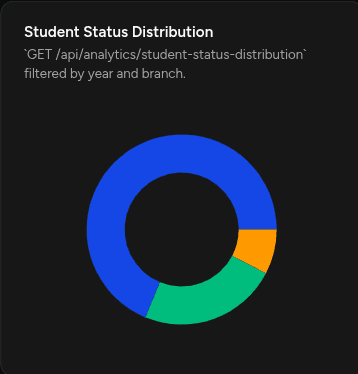
1) Student Status Distribution
- Endpoint:
GET /api/analytics/student-status-distribution - Filters:
year,branch - Feature impact: cohort health pulse (Pass/PCP/Fail).
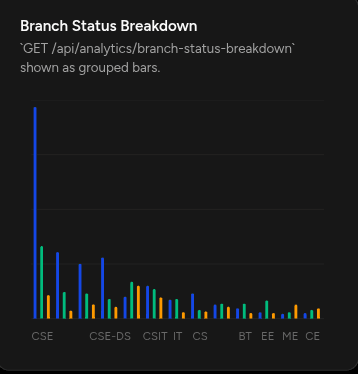
2) Branch Status Breakdown
- Endpoint:
GET /api/analytics/branch-status-breakdown - Filter:
year - Feature impact: branch-level academic strength/risk comparison.
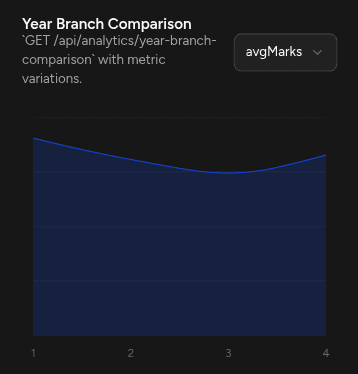
3) Year-Branch Comparison
- Endpoint:
GET /api/analytics/year-branch-comparison - Filters:
years,branches,metric - Feature impact: multi-year trend storytelling across departments.
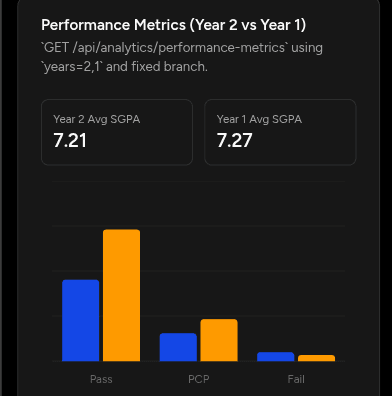
4) Performance Metrics (Two-Year KPI Compare)
- Endpoint:
GET /api/analytics/performance-metrics - Filters:
years=Y1,Y2(required for new behavior), optionalbranch - Feature impact: executive KPI cards with trend direction and percent movement.
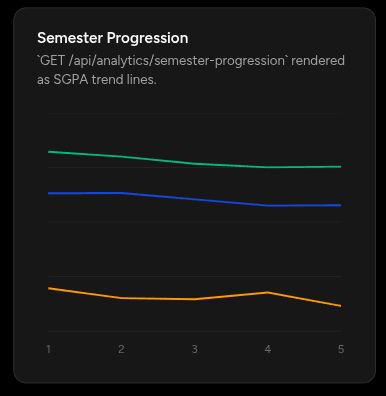
5) Semester Progression
- Endpoint:
GET /api/analytics/semester-progression - Filters:
year,branch - Feature impact: semester growth/decline trajectories.
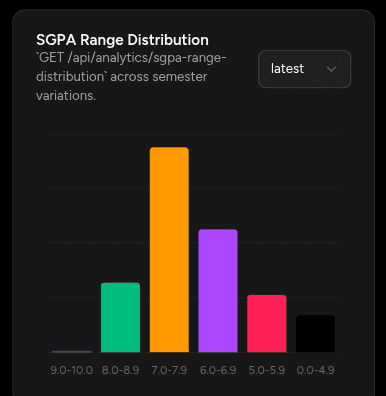
6) SGPA Range Distribution
- Endpoint:
GET /api/analytics/sgpa-range-distribution - Filters:
year,branch,semester - Feature impact: quality band distribution and concentration analysis.
7) Backlog Analysis
- Endpoint:
GET /api/analytics/backlog-analysis - Filters:
year(required),branch,groupBy - Feature impact: active vs cleared backlog intelligence and intervention guidance.
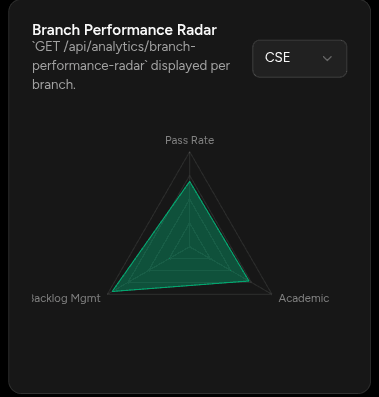
8) Branch Performance Radar
- Endpoint:
GET /api/analytics/branch-performance-radar - Filter:
year - Feature impact: multi-dimensional branch benchmarking.
9) Top Performers
- Endpoint:
GET /api/analytics/top-performers - Filters:
limit,year,branch,metric - Feature impact: achiever spotlight and leaderboard modules.
Analytics Visual Gallery
Analytics chart screenshots use the public URL path /assets/graphs/*, backed by files stored in apps/landing/public/assets/graphs.
These are example visualizations generated from the analytics features documented above.
Playground Intelligence Contract
POST /api/playground/optimizetransforms natural language into structured analytics intent.GET /api/playground/query?text=...resolves intent to analytics data payloads.- Enables admin experimentation workflows for chart-first data exploration.
Product Snapshots Connected to Analytics Experience